MOD MPC2000 / 2000XL
MPC2000 and MPC2000XL memory expansion: the complete SIMM install guide
Both machines ship with 2MB of sound memory and top out at 32MB with two 72-pin SIMMs installed, but that's where the similarity ends. Akai's own manuals disagree on how the case even opens between these two models, the documented memory configuration tables aren't the same shape, and one option-board part number appears on the XL's list that never shows up on the base unit's. Here's what each manual actually says to do, not the forum-recap version.
The short version
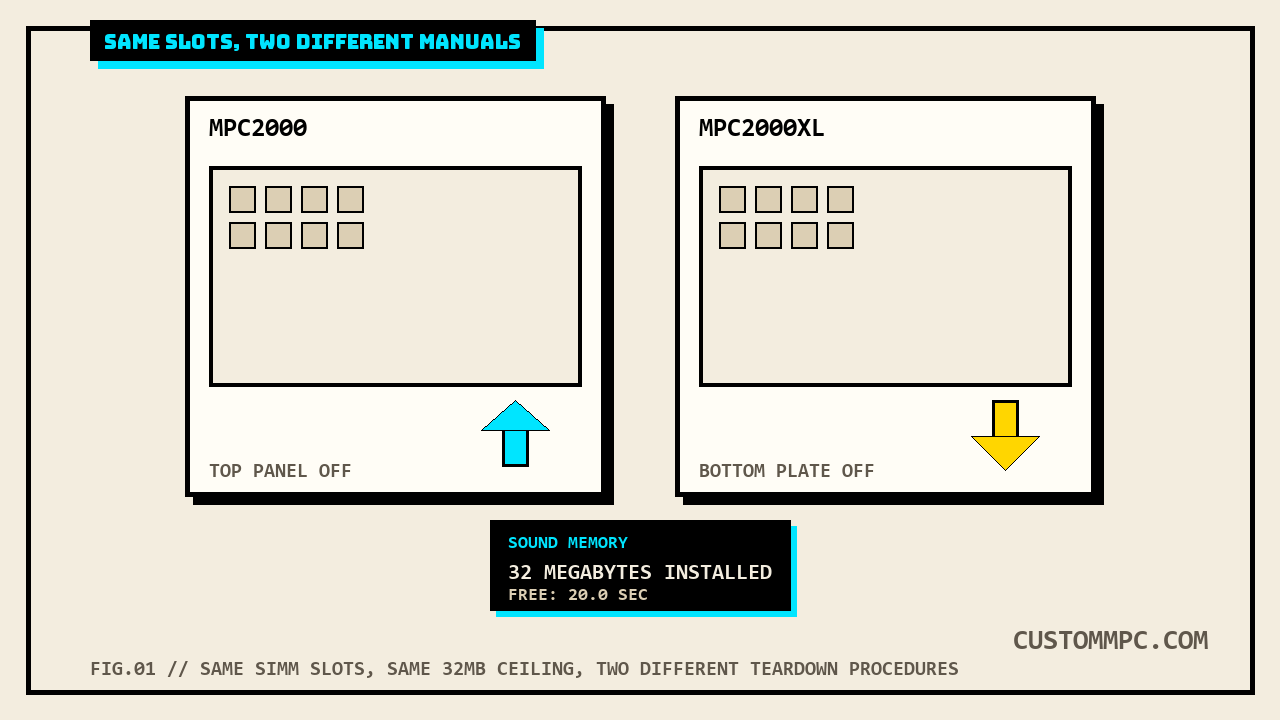
Both machines use two 72-pin SIMM slots and cap out at 32MB total. Past that, the two manuals stop agreeing. The base MPC2000's case comes off from the top, with a specific warning about a CPU ribbon cable you can tear if you're not careful; the MPC2000XL's case comes off from the bottom, no cable warning given. The MPC2000's own configuration table documents finer-grained upgrade paths using mixed 4MB and 16MB SIMMs (6MB, 10MB, 22MB, in addition to the usual stops); the MPC2000XL's table only documents 16MB or 32MB SIMMs, a shorter list of stops on the way to the same 32MB ceiling. Neither difference is a dealbreaker, but both change what you're actually doing with the case open, and neither is mentioned in either model's own buying guide on this site.
DEX'S NOTE: The "do not forget to remove the line connected to the CPU" warning in the base 2000's manual reads like a bad translation, but don't skip past it because of that. It's the one line standing between you and a snapped ribbon cable on a 27-year-old board you can't just order a replacement for. Read it twice before you pull anything.
Why you'd actually do this
Stock, both machines hold 2MB of sound memory, which Akai's own manuals put at 21.9 seconds mono or 10.9 seconds stereo of actual recording time. That's workable for a handful of drum one-shots, but it runs out fast the moment you're layering multi-samples, sampling longer phrases, or building a kit meant to live on the machine permanently instead of getting reloaded from floppy every session. A lot of secondhand units on the market today are still sitting at stock 2MB because the previous owner never bothered, which means the memory ceiling you're actually buying isn't always the 32MB the spec sheet advertises, it's whatever's physically installed. Opening the case and checking is the only way to know for sure, whether or not you're planning to add anything.
Finding SIMMs in 2026
This part is genuinely community knowledge, not something either manual can help with, since Akai wrote these instructions when 72-pin SIMMs were current desktop PC memory, not a discontinued format. Both manuals specify 70ns (nanosecond) speed or faster. 72-pin FPM (Fast Page Mode) SIMMs from the mid-1990s PC and Mac era are what these slots expect, the same modules that were pulled out of desktops en masse when 168-pin DIMMs took over. They still turn up on the used market, mostly through the same vintage-computing sellers who part out old Macs and PCs rather than pro-audio gear sellers, so search there before assuming a music-gear retailer stocks them. Confirm 70ns or faster before buying, and don't assume a SIMM pulled from a random old PC is automatically compatible without checking; parity and non-parity 72-pin SIMMs both exist and aren't always interchangeable across systems, something neither manual addresses because it predates the question being relevant to an MPC specifically.
Static precautions, from the manual
Both manuals give near-identical static-electricity warnings before the install steps, worded for the specific model but otherwise the same list:
"Memory chips are sensitive to static electricity. Please observe the following safety precautions: Unplug the MPC2000 before installing the board(s). The SIMMs may come with a special wrist strap to discharge static electricity. We suggest you attach the strap to the MPC2000's case. If a wrist strap or any other such accessory is not supplied, try discharging any static by touching an earthed metal object before handling the boards. Always handle the memory board by its edges, avoid touching the components on the board. To minimise static electricity, avoid carpeted areas and low humidity areas."
Follow it the way you would for any static-sensitive board work: strap on if you have one, touch an earthed metal object if you don't, and do the actual install somewhere without carpet underfoot.
Opening the case: two different procedures
This is the one nobody's buying guide covers, because it's a mod-guide question, not a purchasing one, and it's the biggest concrete difference between working on these two machines. The base MPC2000's manual has you open it from the top:
"1. Remove the four screws on the MPC2000, the four front screws and pull off the top steel metal leaving the foundation on. 2. Do not forget to remove the line connected to the CPU from the foundation of the operation when you are pulling the top steel metal."
Read that twice if you're doing this for the first time. There's a ribbon or wiring connection running from the top steel cover down to the CPU board, and the manual's own (awkwardly translated) warning is telling you to disconnect it deliberately before the cover comes fully free, not yank the cover off and hope nothing's attached. The MPC2000XL's manual describes a completely different approach, no top cover removal, no cable warning:
"Disconnect the power cable from the MPC2000XL before doing any work on the MPC2000XL! Undo the screws on the bottom plate and remove it."
Bottom-plate access, no cable to track down first. Whatever internal layout change let Akai simplify the procedure between these two models, the practical result is that the two case-opening steps genuinely aren't interchangeable: follow the base 2000's top-cover instructions on a 2000XL and you're doing unnecessary, unsupported disassembly, and follow the 2000XL's bottom-plate instructions on a base 2000 and you won't find the SIMM slots at all.
One more real difference sits in each manual's own board-location list. The base 2000 refers to the memory board generically, just "SIMM Slot" on its internal layout diagram. The 2000XL's equivalent list names a specific board part number the base manual never uses:
"Locations of the MPC2000XL Option Boards: SMPTE 1C chip (IC-M2TC), Effect Board (EB16), Flash ROM (FMX008M), 8 Individual Output with digital I/O (IB-M208P), Simm Memory Board (S3SM16)."
S3SM16 is Akai's own part designation for the 2000XL's memory board specifically. It doesn't appear anywhere in the base 2000's manual, worth knowing if you're ever trying to source a replacement board rather than just SIMMs, since the two models' memory boards aren't documented as the same part.
Seating the SIMMs
Once the case is open and you can see the two 72-pin slots, the install itself is the same physical action on both machines. Both manuals describe it the same way:
"The SIMMs board is inserted at a slight angle and then pushed back where it clips into place. Because SIMMs boards can differ, it is not possible for us to say 'Install them with the components facing the front of the MPC2000' or anything like that because some SIMMs boards have the memory chips mounted on both sides sometimes. However, the boards can only be inserted one way so you shouldn't have any problems, be careful not to force them into place otherwise they may snap."
Both units keep 2MB "hardwired" on the main board, separate from the two SIMM slots, so you're always adding to that base rather than replacing it, at least until you fill both slots with 16MB or larger SIMMs, at which point the onboard 2MB gets ignored entirely (covered in the table section below). Insert at a slight angle, push back until it clips, don't force a SIMM that isn't seating cleanly, it likely means it's the wrong orientation.
The configuration tables, compared
This is the part that actually differs between the two manuals, not just in the numbers but in the shape of the table itself. The base MPC2000's manual documents six configurations, including three that mix a 4MB SIMM into the math:
| Onboard | Slot 1 | Slot 2 | Total |
|---|---|---|---|
| 2M | None | None | 2M |
| 2M | 4M | None | 6M |
| 2M | 4M | 4M | 10M |
| 2M | 16M | None | 18M |
| 2M | 16M | 4M | 22M |
| 2M | 16M | 16M | 32M* |
The MPC2000XL's manual documents four configurations, and doesn't offer a 4MB-SIMM path at all, its smallest expanded step is 18MB, with the base 2000's own 6MB and 10MB stops absent entirely:
| Onboard | Slot 1 | Slot 2 | Total |
|---|---|---|---|
| 2M | None | None | 2M |
| 2M | 16M | None | 18M |
| 2M | 16M | 16M | 32M* |
| 2M | 32M | — | 32M* |
The practical read: the base 2000's table gives you a documented path to add just one 4MB SIMM if that's what you happen to have on hand, landing at 6MB total. The 2000XL's table doesn't document that path at all, its smallest step past stock jumps straight to 18MB with a 16MB SIMM. The 2000XL does document a single-32MB-SIMM option the base 2000's table never lists, filling both slots' worth of capacity with one module instead of two. Neither table is more "correct," they're just documenting different SIMM sizes Akai apparently expected each machine's buyers to have access to when each manual was written, two years apart.
Confirming it actually worked
Once the case is closed back up, both machines have a built-in way to confirm the new total registered, no guessing required. From the Sample mode screen, pressing OPEN WINDOW opens a Sound Memory window that reports installed capacity directly:
"Sound Memory: Free memory (time): 20.0sec, 32 Megabytes installed."
Open Sample mode, press OPEN WINDOW, and read the installed figure directly off the screen. If it doesn't match what you just installed, either a SIMM isn't seated (reopen the case and reseat it before assuming it's defective) or it's the wrong speed rating for the slot to recognize reliably.
What about the MPC3000?
Worth stating plainly rather than guessing: this article doesn't cover the MPC3000's memory expansion procedure, because the only MPC3000 documentation on file here is a Service Manual built around parts lists and board diagrams, not a consumer-facing step-by-step like the 2000 and 2000XL's own Operator's Manuals provide. The service manual confirms the 3000 uses a different mechanism entirely, an EXM3008 expansion board that itself carries SIMM sockets, rather than the 2000/2000XL's two SIMM slots built directly onto the main board. That's a genuinely different upgrade path, not a smaller version of this one, and this site doesn't have the primary-source detail on file yet to walk through it the same way. If that's the machine you're working on, that's a gap, not an omission we're filling with a guess.
Verdict
VERDICT
Confirm which model you actually have before you start, the case-opening procedure genuinely doesn't transfer between them: top cover with a CPU cable to watch on the base 2000, bottom plate with no cable warning on the 2000XL. Buy 70ns-or-faster 72-pin SIMMs from a vintage-computing source, not a pro-audio one, and don't assume a random pulled SIMM is compatible without checking parity. Use each model's own table, the base 2000 documents a smaller 4MB-SIMM step the 2000XL's table skips, and the 2000XL documents a single-32MB-SIMM shortcut the base 2000's table doesn't offer. Verify with the Sound Memory window before you close the case back up for good, not after.
Buying either machine used? The MPC2000 buying guide and the MPC2000XL buying guide cover the full purchase-decision checklist this article doesn't repeat.