GUIDE Effects
MPC harmonic effects: all 19, the catalog's 2nd-largest category
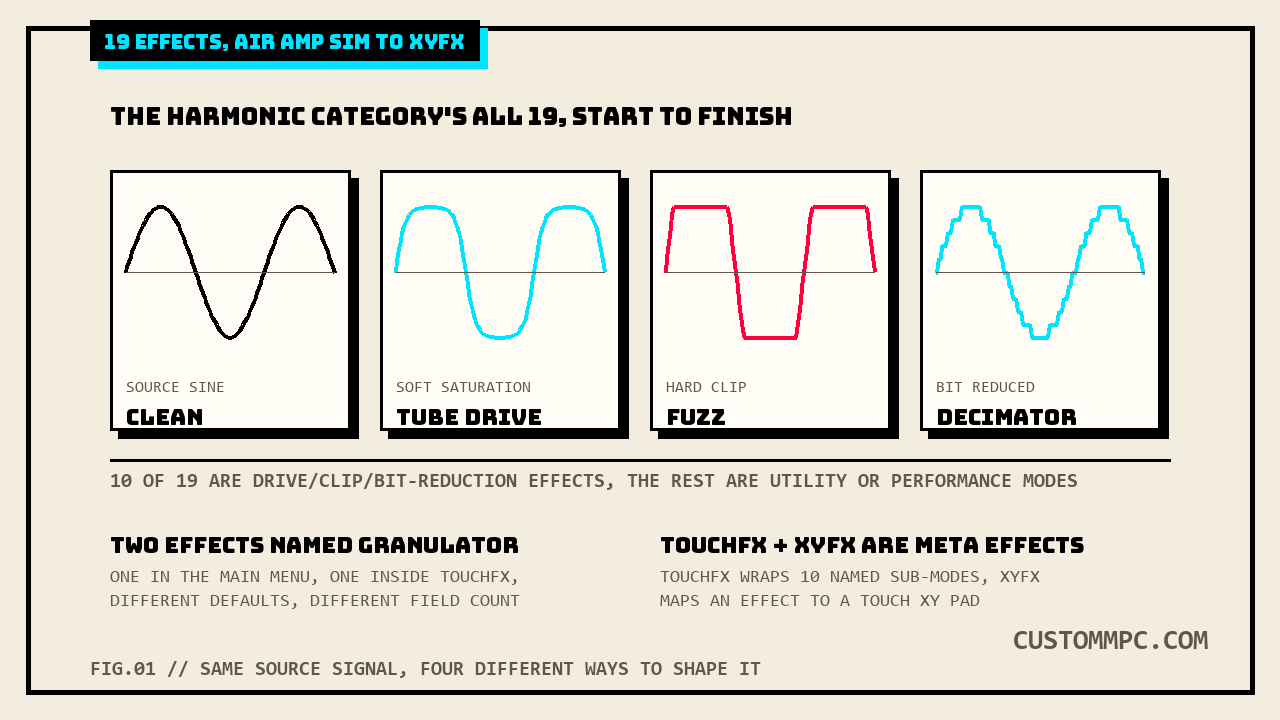
Harmonic is the second-largest of the six effects categories in the MPC's shared 98-effect catalog, 19 entries running from AIR Amp Sim to XYFX. Ten of the nineteen are drive, clip, or bit-reduction effects; the rest split between a granular texture tool, a bit-reduction pair the manual itself compares directly, and two "meta" entries, TouchFX and XYFX, that wrap other effects instead of processing audio on their own. Two of those wrapped effects are both literally named Granulator, with different field counts and different defaults. And two entries near the top of the list, AIR Freq Shift and Frequency Shifter, share almost the same name and nothing else. Checked field by field against Akai's own manual, not assumed from the shared names.
The short version
This site's own insert vs send/return effects article counted every category in the shared 98-effect catalog, and Harmonic came in second only to Delay/Reverb:
"Delay/Reverb 23, Dynamics 14, EQ/Filter 17, Harmonic 19, Modulation 22, Vocal 3, total 98."
Nineteen effects, and the category's own name undersells what's actually in it. "Harmonic" suggests overtone or saturation processing, and ten of the nineteen are exactly that: AIR Amp Sim, AIR Diode Clip, AIR Distortion, AIR Tube Drive, the five named Distortion variants (Amp, Custom, Fuzz, Grimey, Overdrive), and Decimator. But the other nine cover ground the name doesn't suggest at all: AIR Flavor (a lo-fi timbre/tape-emulation effect), AIR Freq Shift and the separately-named Frequency Shifter (two different frequency-shifting effects, not one effect with two names), AIR Lo-Fi (bit-crush plus an LFO/envelope section), AIR Talk Box (a vowel-formant voice effect), Resampler (a gentler cousin of Decimator, the manual says so directly), Granulator (grain-based texture, and there's a second effect with the same name later in this article), and two "meta" entries, TouchFX and XYFX, that don't process audio directly at all, they wrap other effects for touch-strip or XY-pad control.
Where these live: the Harmonic category
Same shared 98-effect list this site has already mapped across five prior articles, one insert-or-send/return catalog split into six categories. Harmonic's own "Options:" line is the second-longest of the six:
"Options: AIR Amp Sim, AIR Diode Clip, AIR Distortion, AIR Flavor, AIR Freq Shift, AIR Lo-Fi, AIR Talk Box, AIR Tube Drive, Decimator, Distortion Amp, Distortion Custom, Distortion Fuzz, Distortion Grimey, Distortion Overdrive, Frequency Shifter, Granulator, Resampler, TouchFX, XYFX"
The whole category runs PDF pp.406–414, nine printed pages, the longest run of any category on this site so far. With this article, all six of the catalog's categories now carry dedicated coverage: Dynamics, EQ/Filter, Delay/Reverb, Modulation, Vocal, and Harmonic closes it out here.
AIR Amp Sim
Akai's own description keeps this one squarely in guitar/bass territory:
"This effect simulates guitar and bass amplifiers with a wide range of available cabinet models and tone shaping options."
| Parameter | Range | Default |
|---|---|---|
| Cab Model | D.I., Brit, 1x8", 1x12", 2x10", 2x12", 4x10", 4x12", 1x15" Bass, 4x10" Bass, Radio | not clearly isolated in the extracted table (see note below) |
| Drive | 0.0–11.0 | 0.0 |
| Mode | Mono, Stereo | Stereo |
| Output | −12.0 – 0.0 – +12.0 dB | 0.0 dB |
| Soft Clip | 0–100% | 0% |
| Top Boost | 0–100% | 0% |
| Bias | 0–100% | 0% |
| Bass | −12.0 – 0.0 – +12.0 dB | −12.0 dB |
| Mid | −12.0 – 0.0 – +12.0 dB | 0.0 dB |
| Mid Freq | 250 Hz – 4.00 kHz | 1.00 kHz |
| Treble | −12.0 – 0.0 – +12.0 dB | 0.0 dB |
Eleven fields, the densest table of any AIR effect in this category. Cab Model's own option list is the longest of any field in the whole article, eleven cabinet/DI choices, and it runs long enough on the printed page that its default value isn't cleanly isolated in either extraction method used for this article, geometry-based table parsing folded the whole option list into one cell with no separate default column detected. Rather than guess a default this article doesn't have sourced, that's disclosed here instead. Every other field on this table extracted cleanly: Drive is a plain 0–11 gain-stage control defaulting fully off, Bass/Mid/Treble form a standard three-band EQ defaulting flat except Bass at −12.0 dB, and Mid Freq sets where the Mid band centers, 250 Hz to 4.00 kHz.
AIR Diode Clip
"This is a distortion effect that can be used for anything from adding subtle grit to drum breaks to aggressive distorted mayhem."
| Parameter | Range | Default |
|---|---|---|
| Input HP | 200 – 800 Hz | 500 Hz |
| Env Speed | 0–100% | 50% |
| Output HP | 1000 – 4000 Hz | 2000 Hz |
| Output LP | 1000 – 12000 Hz | 6000 Hz |
| Wide | Off, On | Off |
| Solo | Off, On | Off |
| Oversampling | Off, On | On |
| Level | −Inf – 0.0 – +12.0 dB | 0.0 dB |
Eight fields, and the only effect in this category with a dedicated Solo toggle, letting you monitor the distortion signal path in isolation while dialing in Input HP and the Output HP/LP window around it. Oversampling defaults On here, unlike most gain-stage effects in this category that don't expose the option at all.
AIR Distortion
"This effect is a multi-type distortion that adds color to your audio signal with varying types and amounts of distortion."
| Parameter | Range | Default |
|---|---|---|
| Mode | Hard, Soft, Wrap | Hard |
| Drive | 0 – 60 dB | 15 dB |
| Output | 0–100% | 100% |
| Mix | 0–100% (dry/wet) | 100% |
| Tone Pre-Shape | −100 – 0 – +100% | 0% |
| Tone High Cut | 1.00 – 20.0 kHz | 20.0 kHz |
| Stereo | On, Off | Off |
| Clipping Thresh. | −20.0 – 0.0 dB FS | −10.0 dB FS |
| Clipping Edge | 0–100% | 0% |
Nine fields built around a three-way Mode switch, Hard/Soft/Wrap, the only field-name-level distortion-shape switch in this category; every named Distortion effect later in this article (Amp, Custom, Fuzz, Grimey, Overdrive) is a fixed circuit instead, not a switchable Mode. Drive here runs in decibels, 0–60 dB, a much wider stated range than the 0–100 unitless Drive knobs on the named Distortion variants below.
AIR Flavor
"This effect applies EQ simulations of radios, phones, tape machines, and more to dramatically change the timbre of your sound."
| Parameter | Range | Default |
|---|---|---|
| Timbre | Varies | Neutral |
| Timbre Depth | 0–100% | 100% |
| Vinyl Distortion | 0–100% | 0% |
| Vinyl Noise | 0–100% | 0% |
| Flutter | 0–100% | 0% |
| Monofy | 0–100% | 0% |
Six fields, the odd one out in this category, this is the only effect here built around emulating old playback media rather than clipping or bit-reducing a signal. Timbre's own range is listed simply as "Varies" in the manual's own Range column rather than a stated list of named presets, no further enumeration given, so this article isn't inventing one. Vinyl Distortion and Vinyl Noise are separate fields, meaning you can add surface noise without the harmonic distortion component, or the reverse.
AIR Freq Shift vs Frequency Shifter
Two entries on the same 19-item Options line, four words apart, describing what sound like the same idea. They are not the same effect. Akai's own description of the AIR version:
"This effect shifts the audio signal's individual frequencies for unique effects."
| Parameter | Range | Default |
|---|---|---|
| Mode | Up, Down, Up & Down, Stereo | Up |
| Frequency | 10.0 mHz – 10.0 kHz | 316 mHz |
| Feedback | 0–100% | 0% |
| Mix | 0–100% (dry/wet) | 100% |
Frequency Shifter's own description, from further down the same category:
"A frequency shifter changes the frequencies of an input signal by a fixed amount and alters the relationship of the original harmonics. This can produce a chorus-like effect as well as very crazy artificial timbres."
| Parameter | Range | Default |
|---|---|---|
| Dry/Wet | 0–100 | 100 |
| Frequency | −1000 – 1000 | 0 |
| Asynchrony | 0–1000 | 0 |
| A Pan | 0–100 | 0 |
| B Pan | 0–100 | 100 |
| A Gain | 0–100 | 75 |
| B Gain | 0–100 | 75 |
Two effects, one shared concept, zero shared fields. AIR Freq Shift's Frequency runs 10.0 mHz to 10.0 kHz, a wide logarithmic-feeling sweep stated in real frequency units, with a Mode switch (Up/Down/Up & Down/Stereo) controlling shift direction and a Feedback knob for re-shifting the shifted signal. Frequency Shifter's Frequency runs a plain −1000 to 1000 with no stated unit in the manual's own table, positive and negative in one control rather than a separate direction switch, and adds an entirely different feature AIR Freq Shift has none of: a two-voice A/B split, each with its own Pan and Gain, plus an Asynchrony field that detunes the two voices from each other, closer in spirit to a stereo-widening chorus effect than a straight pitch-shift utility. Reading Frequency Shifter's Frequency value the way AIR Freq Shift's own Hz-based field works, or the reverse, would set the wrong thing entirely; the two controls aren't measured in the same terms and the effects aren't doing the same job.
AIR Lo-Fi: two tabs, a reused field name
"This effect is used to bit-crush, down-sample, clip, rectify and mangle an audio signal."
AIR Lo-Fi is the only effect in this category built as two switchable tabs, Lo-Fi and Distortion, plus a shared LFO/Env section underneath both:
| Tab | Parameter | Range | Default |
|---|---|---|---|
| Lo-Fi | Bit Depth | 1.0 – 16.0 bit | 16.0 bit |
| Sample Rate | 500 Hz – 50.0 kHz | 50.0 kHz | |
| Mix | 0–100% | 100% | |
| Distortion | Clip | 0.0 – 40.0 dB | 0.0 dB |
| Rectify | 0–100% | 0% | |
| Noise Mod | 0–100% | 0% | |
| Anti-Alias Pre | 0.125 – 2.000 Fs | 0.5000 Fs | |
| Post | 0.125 – 2.000 Fs | 1.000 Fs | |
| Enable (Distortion tab on/off): Off, On, default Off | |||
Underneath both tabs sits a shared LFO/Env block, and it reuses one field name twice with no qualifier distinguishing the two uses:
| Parameter | Range | Default |
|---|---|---|
| Wave | Sine, Tri, Saw, Square, Morse, S&H, Random | Sine |
| Rate (Sync Off) | 0.01 – 10.0 Hz | 1.00 Hz |
| Rate (Sync On) | 8/4 – 16 | 2T |
| Sync | On, Off | Off |
| Depth (LFO section, first occurrence) | −100 – 0 – 100% | 0% |
| Attack | 0.1 – 10.0 s | 0.5 s |
| Release | 0.1 – 10.0 s | 0.5 s |
| Depth (Env section, second occurrence) | −100 – 0 – 100% | 0% |
Both rows print as a bare "Depth" in the source table with an identical −100 to 100% range and identical 0% default, and the manual's own layout gives no qualifying word on either row, LFO or Env. This article's own reading, based on position (the first Depth sits directly under Rate/Sync, the second sits directly under Attack/Release) rather than any label the manual states outright, is that the first Depth sets how much the LFO modulates, and the second sets how much the envelope follower modulates. Worth comparing against AIR Talk Box below, which reuses the same LFO-then-envelope structure but prefixes every field (LFO Wave, LFO Depth, Env Thresh, Env Attack) so there's no ambiguity at all.
AIR Talk Box
"This effect adds voice-like resonances to audio signals."
| Parameter | Range | Default |
|---|---|---|
| Vowel | OO, OU, AU, AH, AA, AE, EA, EE, EH, ER, UH, OH, OO | AH |
| Env Depth | −100 – 0 – +100% | 0% |
| Formant | −12.00 – +12.00 | 0.00 |
| Mix | 0–100% | 100% |
| LFO Wave | Sine, Tri, Saw, Square, S&H, Random | Sine |
| LFO Rate (Sync Off) | 0.01 – 10.0 Hz | 1.00 Hz |
| LFO Rate (Sync On) | 8/4 – 16 | 2T |
| LFO Sync | Off, On | Off |
| LFO Depth | −100 – 0 – +100% | 0% |
| Env Thresh | −60.0 – 0.0 dB | −30.0 dB |
| Env Attack | 0.1 – 10.0 s | 0.5 s |
| Env Release | 0.1 – 10.0 s | 0.5 s |
Twelve fields, the densest table in this category, and notably the one effect here that lets you sculpt a full vowel character (13-option Vowel list, Formant shift, Env Depth) on top of an LFO/envelope-follower combination structurally identical to AIR Lo-Fi's, but with every field cleanly prefixed LFO or Env, avoiding the bare-"Depth" ambiguity AIR Lo-Fi's own table has.
AIR Tube Drive
"This effect is designed to reproduce the sound of an overdriven tube amplifier."
| Parameter | Range | Default |
|---|---|---|
| Drive | 0–100% | 0% |
| Headroom | −30.0 – 0.0 dB | −15.0 dB |
| Saturation | 0–100% | 50% |
| Output | −20.0 – +20.0 dB | 0.0 dB |
Four fields, the simplest of the eight AIR effects in this category. Headroom and Saturation are two separate controls rather than one combined Drive knob doing both jobs, Headroom sets how much signal the stage can take before it starts saturating, Saturation sets how hard it saturates once past that point.
The 5 named Distortion variants
Five effects share the "Distortion ___" naming pattern and an identical opening field, Dry/Wet, 0–100, defaulting fully wet at 100 on every one of the five:
| Effect | Fields (after Dry/Wet) | Description |
|---|---|---|
| Distortion Amp | Drive, Tone, Dynamics, Output | "This effect is designed to reproduce the sound of a tube amplifier at high volumes." |
| Distortion Custom | Drive, +Soft, +Clip, −Soft, −Clip, Low, Mid, High, Output | "This effect is a highly customized distortion, capable of a wide range of useable sounds." |
| Distortion Fuzz | Drive, Output, Low, Low-Mid, High-Mid, High | "This popular effect uses hard clipping of the audio signal, which, at extreme settings, can turn a standard waveform into a square wave, producing a "razor" effect." |
| Distortion Grimey | Drive, Grime, Center, Width, Resonance, Output | "This is a unique distortion effect that distorts a frequency range in a selectable band." |
| Distortion Overdrive | Drive, Tone, Output | "This distortion is designed to sound like a mildly distorting amplifier at medium volumes. It is the smoothest distortion type available." |
Field count alone tells most of the story. Distortion Custom carries ten fields total, by far the largest of the five, with a plus/minus soft-clip and hard-clip pair (+Soft/+Clip for the positive half of the waveform, −Soft/−Clip for the negative half, each independently adjustable) plus a full three-band Low/Mid/High EQ, nothing else in this family gets that level of control. Distortion Overdrive sits at the opposite end, three fields past Dry/Wet, Drive/Tone/Output, matching its own description as "the smoothest distortion type available." Distortion Grimey is the only one of the five built around a swept frequency band, Center and Width set where the distortion concentrates and how wide that band runs, with Resonance adding emphasis at the edges. One value worth a second look: Distortion Custom's own Output field is listed with a −18.0 to 18.0 dB range but a bare default of "50" rather than a dB figure, printed exactly that way in the source table; transcribed here as-is rather than corrected to a guessed dB value.
Decimator vs Resampler
The only pair in this entire category the manual compares directly, in Decimator's own description:
"Decimator down-samples the incoming signal by removing bits from the digital signal. The difference between decimation and resampling is that Decimator does not use any filtering to mask or correct digital artifacts. The result is an effect ranging from mild to almost completely pure digital distortion, depending on the setting and the source material."
"Resampler is similar to Decimator in that it removes bits from an incoming signal. The difference is that Resampler applies a complex suite of filters and anti-aliasing to attempt to retain the original sound quality. This is a method used by popular vintage samplers and sampling drum machines from the 1980s. Resampler can be used to achieve a "dirty" sound on drum loops, without the harshness of distortion."
| Effect | Fields |
|---|---|
| Decimator | Dry/Wet (0–100, default 100), Decimate (0–100, default 0), Bit Reducer (4–32, default 32) |
| Resampler | Dry/Wet (0–100, default 100), Rate (0–100, default 0), Decimate (0–100, default 0) |
Three fields each, and a genuine tie sits right in the middle: both effects carry a field literally named Decimate, same 0–100 range, same 0 default. That's not a naming coincidence to flag as a trap, the manual's own text says these two effects work the same basic way, so a shared Decimate field is exactly what the description promises. Where they diverge: Decimator's third field is Bit Reducer, a direct 4-to-32-bit depth control; Resampler's third field is Rate instead, no bit-depth field at all, consistent with Resampler applying the "complex suite of filters and anti-aliasing" the manual describes rather than a raw bit-crush.
Granulator
"This effect turns your incoming audio into small grains of sound that can be looped, pitch shifted, and manipulated in new and interesting ways."
| Parameter | Range | Default |
|---|---|---|
| Grain Density | 1.0–300.0 grains/sec | 68.0 grains/sec |
| Grain Window | 20.0–1000.0 ms | 608.0 ms |
| Grain Length | 10.0–200.0 ms | 171.9 ms |
| Grain Feedback | −99.9 – 0.0 – 99.9% | 0.0% |
| Trigger Randomization | 0–100% | 0.0% |
| Pitch Randomization | 0–100% | 0.0% |
| Pitch | −12.0 – 0.0 – 12.0 semitones | 0.0 semitones |
| Fine | −50.0 – 0.0 – 50.0% | 0.0% |
| Stereo | 0–100% | 0.0% |
| Mix | 0–100% | 34.6% |
| Freeze | Off, On | Off |
Eleven fields, the largest single-tab table in this category, and the only Harmonic effect with a Freeze toggle, holding the current grain buffer in place rather than continuing to sample fresh audio. Mix is the one field here that doesn't default sensibly to 0 or 100, it opens at 34.6%, an unusually specific number for a default value in this manual. Pitch is a coarse ±12-semitone control with a separate Fine percentage trim alongside it, unlike the named Distortion effects above where Pitch-style controls, when present at all, run as one field. Hold that field list in mind: TouchFX below contains a second effect also named Granulator, and the two don't match.
TouchFX: 10 more effects inside one
"TouchFX is specially designed for use with the touch strip controller on MPC Key 61, but can be used on any MPC hardware and controlled using the onscreen touch slider or an external MIDI device."
TouchFX doesn't process audio on its own, it's a container: loading it onto a track gives you a menu of ten selectable sub-effects, each with its own full parameter table, all controlled by one touch strip or MIDI CC instead of the pads:
| Sub-effect | Fields | Notable default |
|---|---|---|
| Manual Filter | Cutoff, Resonance, Mode | Mode: LowPass |
| Beat Sync Filter | Cutoff, Resonance, Manual Speed, Depth, Mode, Shape, Sync Speed | Mode: BandPass, Shape: Ramp Up |
| Beat Sync Delay | Cutoff, Resonance, Feedback, Diffusion, Mode, Delay Time, Delay Mode, Octave Mode | Delay Mode: Normal |
| Beat Repeat | Cutoff, Resonance, Mode, Delay Time, Reverse | Delay Time: 1/4 |
| Tape Stop | Cutoff, Manual Stop Time, Sync Stop Time | Manual Stop Time: 2.50 s |
| Phaser | Feedback, Manual Speed, Sync Speed | Feedback: 100.0%, Sync Speed: 1/4 |
| Comb Filter | Feedback, Manual Speed, Sync Speed | Feedback: 100.0%, Sync Speed: 1/4 |
| Washout | Cutoff, Resonance, Feedback, Diffusion, Delay Time | Delay Time: 1 Bar |
| Granulator | Density, Window Length, Grain Length, Grain Feedback, Pitch, Stereo Spread | Density: 150.0 grains/sec |
| Manual Flanger | Frequency, Feedback | Frequency: 4000.00 Hz |
Two findings, checked field by field rather than assumed. First, Phaser and Comb Filter are a genuine tie, byte-identical field lists (Feedback, Manual Speed, Sync Speed) and byte-identical defaults (Feedback 100.0%, Manual Speed Off, Sync Speed 1/4), the manual's own description frames them as related, a comb filter "creates 'notches' in the frequency spectrum, similar to the phaser," and the parameter tables back that up exactly.
Second, and the strongest naming trap in this article: TouchFX's own Granulator sub-effect is not the same effect as the main-menu Granulator covered above. Same name, six fields instead of eleven, no Freeze toggle, no Trigger or Pitch Randomization, no separate Mix knob, and where they'd overlap conceptually the field names and defaults still don't match. The main-menu version's field is called Grain Density, defaulting to 68.0 grains/sec; TouchFX's is just Density, defaulting to 150.0 grains/sec, more than double. The main-menu version's Grain Window defaults to 608.0 ms; TouchFX's equivalent, renamed Window Length, defaults to 510.0 ms. Grain Length defaults 171.9 ms on the main-menu version against 105.0 ms on TouchFX's. Two effects, identical name, different field count, different field names for the same concepts, and different numbers on every default they do share a concept with.
XYFX: the one with no effect of its own
XYFX closes the Harmonic Options list, and its own entry in the Effects & Parameters appendix is a single line, a pointer rather than a table:
"See Operation > Modes > XYFX Mode for more information."
Following that pointer to the Operation chapter, XYFX turns the touchscreen into an XY pad where each axis controls a different parameter of whichever effect you've assigned to it, and it comes with three of its own fixed controls that don't belong to any single wrapped effect:
"XYFX Mode turns the touchscreen into an XY pad where each axis represents the range of an effect parameter... The effect you control in XYFX Mode acts like an insert effect on that track. In fact, XYFX is the name of the insert effect you have to load to the track before you can use this mode."
Attack sets how long it takes the dry signal to reach full wet after you touch the pad; Release sets how long it takes to fall back to dry after you release it; Wet/Dry blends the two. What the X and Y axes actually control depends entirely on which effect preset is loaded, and here's a real documentation gap this article isn't papering over: the manual's own walkthrough for recording XY automation explicitly narrows the preset list without ever printing it.
"Double-tap the Preset field, and tap an effect to select it. (These are just the effects available in XYFX Mode, not all MPC effects.) Swipe up or down to view the complete list."
That's as specific as the manual gets. It confirms XYFX doesn't offer the full 98-effect catalog on its Preset field, but it never states which subset does appear, so this article isn't guessing one. TouchFX, by contrast, documents all ten of its own sub-effects by name with full tables, which makes it the more transparent of this category's two meta effects even though both work on the same touch-control principle.
Side by side
| Effect | Type | Fields |
|---|---|---|
| AIR Amp Sim | Drive/EQ | 11 |
| AIR Diode Clip | Drive | 8 |
| AIR Distortion | Drive (switchable mode) | 9 |
| AIR Flavor | Timbre/tape emulation | 6 |
| AIR Freq Shift | Frequency shift | 4 |
| AIR Lo-Fi | Bit-crush (2 tabs) | 8 + 8 shared |
| AIR Talk Box | Voice/formant | 12 |
| AIR Tube Drive | Drive | 4 |
| Distortion Amp | Drive | 5 |
| Distortion Custom | Drive (3-band + split clip) | 10 |
| Distortion Fuzz | Drive (hard clip) | 7 |
| Distortion Grimey | Drive (banded) | 7 |
| Distortion Overdrive | Drive (smooth) | 4 |
| Frequency Shifter | Frequency shift (dual-voice) | 7 |
| Granulator | Grain/texture | 11 |
| Resampler | Bit-crush + filtering | 3 |
| Decimator | Bit-crush | 3 |
| TouchFX | Meta (10 sub-effects) | varies |
| XYFX | Meta (XY-controlled) | 3 fixed + wrapped effect |
Common mistakes
Mistake: assuming AIR Freq Shift and Frequency Shifter are the same effect under two names. They share zero fields. AIR Freq Shift's Frequency is stated in Hz (10.0 mHz–10.0 kHz); Frequency Shifter's Frequency is a plain −1000 to 1000 with no stated unit and adds a two-voice A/B pan/gain split AIR Freq Shift doesn't have at all.
Mistake: assuming the main-menu Granulator and TouchFX's Granulator are the same effect. The main-menu version has eleven fields including Freeze and two Randomization controls; TouchFX's has six, renames Grain Density to Density and Grain Window to Window Length, and defaults its grain rate at 150.0 grains/sec against the main version's 68.0.
Mistake: expecting XYFX's Preset field to offer every effect in the catalog. Akai's own walkthrough states directly that the Preset list is "just the effects available in XYFX Mode, not all MPC effects," without ever printing which ones qualify, a documentation gap this article discloses rather than guesses past.
A note on manual versions
Every parameter table above is checked directly against Akai's Standalone OS User Guide, Manual Version 3.9, cross-checked line-for-line against Manual Version 3.7. A direct diff of both manuals' Harmonic-category pages (v3.9 PDF pp.406–414, v3.7 PDF pp.385–393), normalized for whitespace and page-number lines, returned zero content differences across the full nine-page run, every effect name, description sentence, and parameter value identical between editions. The chapter sits at the same flat plus-21 page offset between versions this site keeps finding across the manual (406 minus 385 equals 21, 414 minus 393 equals 21), a seventh confirmed data point that the whole effects appendix shifted as one contiguous block between v3.7 and v3.9 rather than section by section.
Verdict
VERDICT
Want straightforward amp/tube/fuzz character: AIR Amp Sim, AIR Tube Drive, or one of the five named Distortion variants, Overdrive for the smoothest, Custom for the most control (ten fields, a split soft/hard clip and full 3-band EQ). Want bit-crush texture: Decimator for raw and aggressive, Resampler for a gentler, filtered version of the same idea, the manual's own words, not this article's. Want grain/texture manipulation: the main-menu Granulator, eleven fields including Freeze, not TouchFX's six-field namesake. Want touch-strip performance control: TouchFX, ten fully documented sub-effects, more transparent than XYFX's undisclosed preset subset. Chasing a frequency-shift effect by name alone: check whether you actually want AIR Freq Shift's Hz-based single-voice shift or Frequency Shifter's dual-voice A/B split before assuming the name tells you which.
Found a session where the two Granulators' different defaults caught you off guard? Tell us about it.