GUIDE Live Control Mode
MPC Live Control Mode: which units actually support Ableton Live control
Six current MPC models can put Ableton Live's session view, mixer, and device parameters directly on the hardware, pads and all, no mouse required. Four current models flat out cannot. And one unit lost that ability somewhere between two manual versions, with nothing in Akai's own changelog announcing the change.
The short version
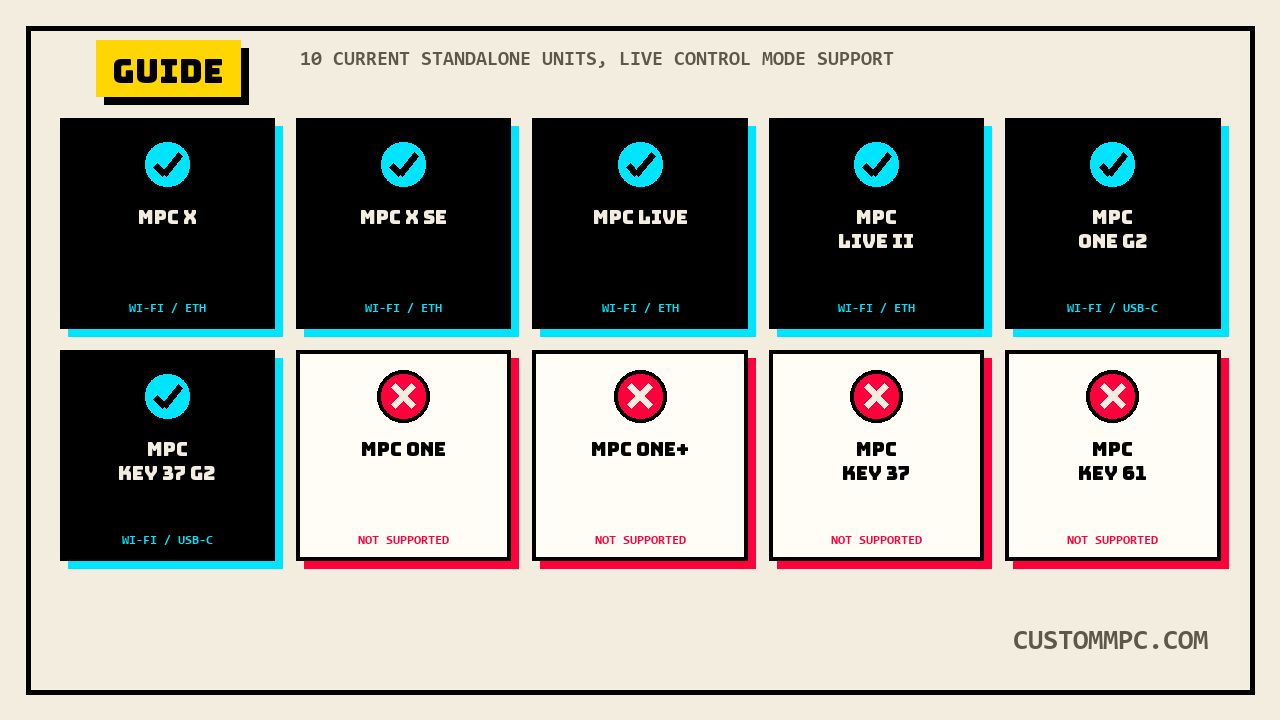
Live Control Mode is a dedicated screen on standalone MPC hardware that mirrors and controls Ableton Live 10.1.2 or later, no computer keyboard or mouse involved once it's connected. Akai's own manual describes it as MPC hardware "pre-mapped to control Ableton Live... for instant performance and production setup," switchable in and out without stopping playback. It is not available on every current MPC. Akai's own v3.9 manual states plainly that MPC One, MPC One+, MPC Key 37, and MPC Key 61 cannot run it at all, a four-unit exclusion list that has grown since the v3.7 manual, which excluded only two of those four. The other six current standalone units, MPC X, MPC X SE, MPC Live, MPC Live II, MPC One G2, and MPC Key 37 G2, all get it, connected over Wi-Fi, a USB-to-Ethernet adapter, or, on the two newest G2 units, directly over USB-C.
SAM'S NOTE: I keep seeing "Live Control Mode" and assuming it means "the MPC Live's control mode," which is exactly backward. It's named for Ableton Live, the software, not the hardware family, and the MPC Live line is actually one of the ones that gets it. The unit that doesn't, despite the confusing name overlap, is the MPC One, twice over.
What Live Control Mode actually does
Once connected, Live Control Mode replaces the standalone MPC interface with a dedicated Ableton Live control surface: three switchable views (Matrix, Mixer, Device Control), a configurable Control Bar across the top, and a full remap of the hardware's pads, knobs, and Q-Links to Live's own session, mixer, and device parameters. Every view shares four controls regardless of which tab is active: tapping a track name selects it, the stop icons at the bottom halt clips on the selected track, the Launch Quantize field sets clip-launch timing, and the Scene Launch arrows fire an entire row of clips at once. The full hardware mapping, which physical pad or knob controls which Live parameter, lives in a separate Ableton Control Maps appendix this article did not pull in; the manual's own cross-reference points there rather than listing the mappings inline in the Live Control Mode chapter itself.
Which units support it, and the one that lost it
Akai's own manual states the exclusion list as a flat fact, no qualifiers: Live Control Mode is not available with MPC One, MPC One+, MPC Key 37, or MPC Key 61. Cross-checking the same note against the older v3.7 manual turns up a real, disclosable change: v3.7's version of that exact sentence excludes only two units, not four.
"Note: Live Control Mode is not available with MPC Key 37 and MPC Key 61."
MPC One and MPC One+ are absent from the v3.7 exclusion list entirely. Somewhere between the v3.7 and v3.9 manual revisions, Akai's own documentation added the original MPC One line to the list of units that cannot run Live Control Mode. Neither manual's own "Updates" changelog section mentions Live Control Mode being removed from any unit, so this article states the documented fact, the exclusion list grew by two names between versions, without guessing why: whether the feature never fully worked on MPC One hardware and got a quiet correction, or something else, isn't stated anywhere in either manual.
The current, v3.9-confirmed support list is six units: MPC X, MPC X SE, MPC Live, MPC Live II, MPC One G2, and MPC Key 37 G2. The first four connect over Wi-Fi or a USB-to-Ethernet adapter; the two newest, MPC One G2 and MPC Key 37 G2, add a direct USB-C option. That sentence names MPC One G2 as a supported unit. But a second passage in the same v3.9 manual, the "Updates in v3.9" changelog's own MPC One G2 and MPC Key 37 G2 Support entry, credits Live Control Mode support over USB to only one of those two new units by name:
"MPC Key 37 G2 includes Ableton Live Control Mode support over USB."
MPC One G2 is not named in that bullet. This site's own Q-Link mapping check below finds MPC One G2 grouped with the confirmed-supported units a third time, so the weight of evidence across the manual is that MPC One G2 does support Live Control Mode, the changelog bullet just doesn't say so by name. That's a real inconsistency inside Akai's own v3.9 document, stated here rather than silently resolved, not a reason to doubt the Setup chapter's direct USB-C instructions for the unit.
Getting it running
Wi-Fi and USB-to-Ethernet setups both route through a piece of desktop software, the Akai Network Driver, downloaded from an akaipro.com account or the inMusic Software Center. The direct USB-C path on MPC One G2 and MPC Key 37 G2 skips that step entirely. After installing the driver and restarting, the MPC side of setup is a Wi-Fi or Ethernet connection plus selecting the unit inside the Network Driver app by its IP address and serial number, both readable on the MPC itself by holding Shift and tapping Info in the Wi-Fi menu. The Ableton side has its own minimum version requirement and a specific control surface name to select, one that doesn't obviously say "MPC" at first glance:
"Important: To use MPC to control Ableton Live, you will need to download and install version 10.1.2 or later. Open Ableton Live 10.1.2 or later. Open the Preferences menu by selecting Live > Preferences. Make sure you have selected your preferred Audio Device in the Audio tab. In the Link / MIDI tab, click the first available Control Surface field and select Akai Force MPC. In the same row, select Akai Network - DAW Control as the Input and Output. Under the MIDI Ports section, set Remote for the Akai_Force_MPC Input and Akai_Force_MPC Output to On."
"Akai Force MPC" is the exact string the manual instructs you to select in Ableton's Control Surface dropdown, on MPC hardware, not Force hardware. That's a real naming leftover in Ableton's own control-surface list, not a typo in Akai's manual, and worth knowing before assuming the dropdown option is wrong or missing. Once that's set and the driver shows the unit connected, opening Live Control Mode is a single tap: press Menu, or tap the icon in the display's upper-left corner, then tap Live Control. The same path in reverse, tap Menu and select another mode, exits it.
Three views, one shared control row
Matrix View, Mixer View, and Device Control View sit on tabs down the left side of the display, and switching between them doesn't stop anything playing in Ableton Live. Which view is open just changes what the touchscreen and the hardware's pre-mapped controls are currently pointed at.
The Control Bar's three presets
Above all three views, a configurable Control Bar exposes transport and timing controls, in one of three preset layouts chosen from a Settings window (the gear icon, top-right):
- Session — built for Ableton's 8x8 clip-launch grid: BPM, tempo nudge, metronome toggle, a Follow toggle that keeps Live's own display tracking playback position, a Position field, MIDI Arrangement Overdubbing toggle, and automation-record toggle.
- Arrangement — built for the linear Arrangement view: BPM, Position, a loop Start field, loop on/off, and loop Length.
- Performance — built for real-time playing: BPM, tempo nudge, and a Quantize To field with eight time-division options (1/4 through 1/32, including triplet and mixed straight-plus-triplet settings).
The manual's own field name for the preset selector, "Control Bar field," lists its first option as "Settings" rather than "Session" in that specific sentence, while every other reference to the same preset in the same paragraph and the section heading itself calls it "Session." Read in context, that's a clear one-word slip in the manual's own text, not a fourth hidden preset, and this article treats it as such rather than inventing a "Settings" mode nothing else in the chapter describes.
Matrix View: the pad-color states
Matrix View mirrors up to eight tracks and eight rows of Ableton's own Session view clip grid, with the same names and colors assigned inside Ableton showing up on both the MPC's screen and its hardware pads. The pad-color logic is a real, four-state system worth knowing before it looks broken:
"When a clip is stopped, it will display the color set in Ableton Live on both the hardware pads and display. When a clip is playing, the hardware pad will blink green, and the clip on the display will fill with white based on the clip length. When a clip is preparing to record, it will flash red on both the hardware pads and display until the launch quantization value is reached. When a clip is recording, it will blink red on the hardware pads and be lit red on the display."
Four buttons along the bottom of the display round out the view: Quantize applies the Control Bar's Quantize To value to the selected clip, Delete removes it, Insert Scene adds a new scene after the current selection, and Rec toggles Ableton's own Arrangement Record, the specific button that captures a Session-view performance into the linear Arrangement.
Mixer View: three tabs deep
Mixer View splits into its own three sub-tabs along the bottom of the display, each exposing a different slice of Ableton's mixer:
- Levels — an overview of every track's volume, plus Returns and the Main Output, adjustable by tapping a slider and using the data dial, or by dragging directly.
- Main — a full channel strip per track: mute (track activator), solo, record-arm, pan, and level, with a double-tap on any slider opening a larger version.
- Sends — send-level knobs per track plus A/B cue-mix assignment buttons for Ableton's Crossfader-adjacent cue system.
That's the same Send/Return vocabulary this site's own Insert vs Send/Return guide covers for MPC's own internal effects bus, reused here for Ableton's mixer instead, worth knowing the two systems are unrelated even though the field names overlap.
Device Control View
Device Control View hands over parameter control of whatever MIDI instrument, audio effect, or other device is currently targeted by Ableton's own "blue hand" remote-control icon in its Detail View, the same targeting mechanism Ableton uses for any hardware control surface, not something MPC-specific. Device and bank stepper buttons move between multiple devices on one track and between parameter banks within a device, showing the actual bank name for Ableton's own built-in instruments and effects but only a bank number for third-party plugins, a real, disclosed limitation rather than a universal feature.
Q-Links, mapped differently per unit
The physical Q-Link knobs get a genuinely different mapping scheme depending on which supported unit is running Live Control Mode, not one universal layout:
"On MPC X/X SE, Q-Links 1 through 8 control track volume for the eight tracks currently in view, while Q-Links 9 through 16 control the device on the currently selected track, based on the 'blue hand' in Ableton Live's Detail View... On MPC Live/Live II/One G2/Key 37 G2, Q-Link Banks 1 and 2 control track volume, and Q-Link Banks 3 and 4 control the current device at the 'blue hand' position."
MPC X and MPC X SE get sixteen individual physical Q-Link knobs split straight down the middle, eight for volume and eight for the targeted device. The four smaller-format units, which only carry four physical Q-Links each, get the same volume-then-device split reorganized into switchable banks instead of dedicated knobs, Banks 1 and 2 for volume, Banks 3 and 4 for device control. Both schemes are confirmed in this site's own Q-Link guide to differ per unit even outside Live Control Mode, and Akai's own manual explains the touch-and-hold shortcut for checking which bank is active: "Press and hold the Q-Link button to bring up the Q-Links Overview on the touchscreen, where you can view the current assignments and quickly select another bank." MPC One G2 and MPC Key 37 G2 both appear in this Q-Link list alongside the already-confirmed MPC Live/Live II, a third independent mention of MPC One G2 as a supported unit, further weight against the "Updates in v3.9" changelog bullet's narrower, Key-37-G2-only phrasing above.
Common mistakes
Mistake: assuming MPC One supports Live Control Mode because MPC One G2 does. They're treated as entirely separate machines by Akai's own exclusion note. The original MPC One and MPC One+ are both explicitly excluded in the current manual; only the G2 revision is supported, and only over direct USB-C or Wi-Fi through the Network Driver.
Mistake: skipping the Akai Network Driver on a Wi-Fi or USB-to-Ethernet setup. That software is required for those two connection methods on every supported unit except the direct USB-C path, which is limited to MPC One G2 and MPC Key 37 G2 specifically.
Mistake: running an older copy of Ableton Live and expecting the Control Surface option to appear. The manual states a hard floor, version 10.1.2, below which the "Akai Force MPC" control surface option and the whole feature aren't available.
Mistake: expecting the Bank display to always show a plugin's bank name. Only Ableton's own built-in devices get a named bank in Device Control View; third-party plugins show a bank number instead.
A note on manual versions
Every technical claim above is checked directly against Akai's Standalone OS User Guide, Manual Version 3.9, cross-checked against Manual Version 3.7 for the exclusion-list change this article's central finding rests on. The Live Control Mode chapter carries a flat plus-10 page offset between versions, confirmed independently at the chapter's own opening (p.322 in v3.9, p.312 in v3.7, matching the Table of Contents entry for both), consistent with the same kind of flat, chapter-wide offset this site's Sample Edit / Process menu guide and several other articles have already documented elsewhere in the same manual.
The exclusion-list wording itself is not flat between versions, unlike the surrounding page numbers: v3.7 names two units, v3.9 names four, an actual content change riding on top of the numbering shift rather than a copy-paste artifact. The "MPC One G2 and MPC Key 37 G2 Support" changelog entry this article also cites exists only in v3.9's own "Updates in v3.9" section (p.8); a direct search of the full v3.7 extraction returns zero hits for "MPC One G2," confirming that hardware postdates the v3.7 manual entirely, consistent with this site's MPC One Buying Guide dating the G2 line's announcement well after v3.7's release.
Verdict
VERDICT
Own an MPC X, X SE, Live, Live II, One G2, or Key 37 G2: Live Control Mode is available, install the Akai Network Driver (unless you're on the direct USB-C path), update to Ableton Live 10.1.2 or later, and select "Akai Force MPC" as the control surface, not a typo. Own an MPC One, One+, Key 37, or Key 61: Akai's own current manual is explicit that the feature isn't there, and for the original MPC One line specifically, it may not have always been that way, the exclusion is new since the v3.7 manual, with no changelog entry explaining why.
Running Live Control Mode on a unit or connection method this article didn't cover? Tell us what happened.