GUIDE Effects
MPC Drum FX: 8 slots, 14 effect types, and a rack Akai barely writes about
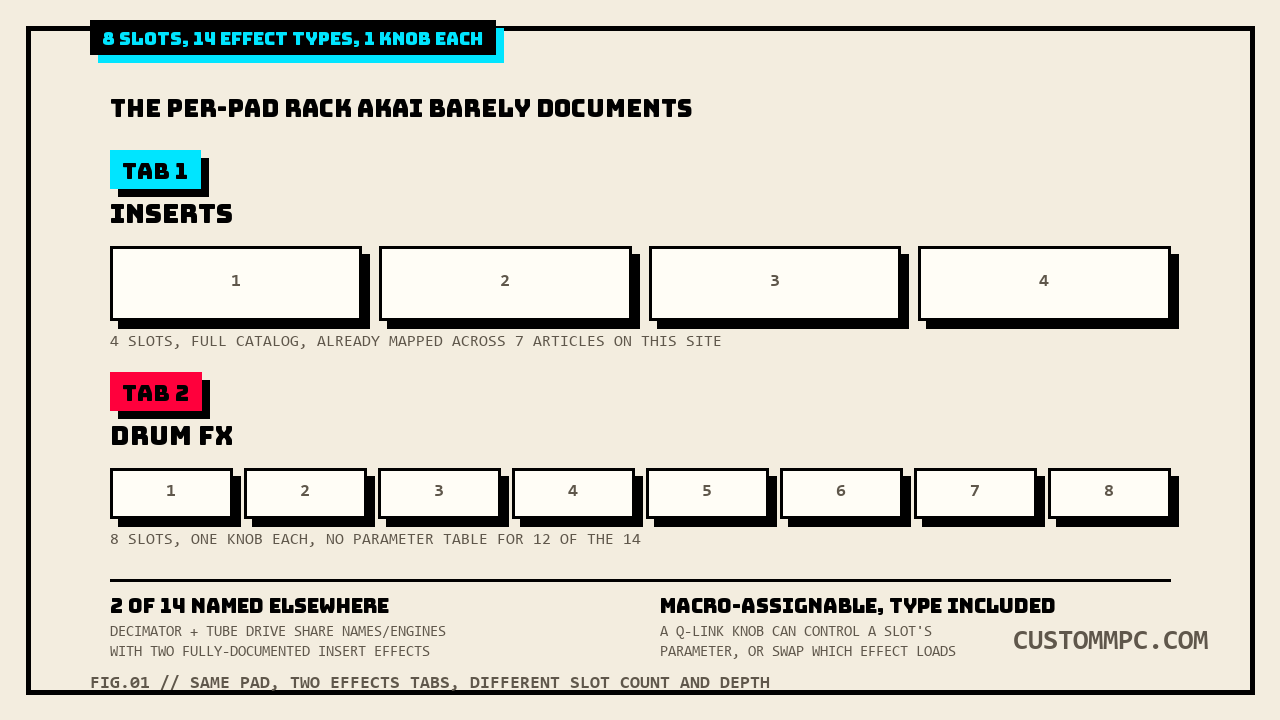
Every pad on a Drum track carries two separate effects racks, not one. The first is Inserts, four slots pulling from the same shared 98-effect catalog this site has already mapped across seven prior articles. The second lives one tab over: Drum FX, eight slots, a smaller 14-effect catalog, one knob per slot instead of a full parameter table. Two of those fourteen, Decimator and Tube Drive, share names and engines with effects this site has already fully documented. The other twelve get a name in a bullet list and nothing else, no description, no parameter range, not one printed sentence, in any version of Akai's own manual checked for this article.
The short version
Drum FX is a second, smaller effects rack that lives on every pad of a Drum track, separate from the four-slot Inserts rack this site's own insert vs send/return effects article already mapped. Eight slots, one knob per slot, and a 14-effect Type list: Ring Mod, Bit Crush, Decimator, Tube Drive, Soft Clipper, Hard Clipper, Low Pass, High Pass, Rectifier, three Bass Enhancer variants (Tight, Medium, Wide), Wave Folder, and Gain. Akai's own Standalone OS manual gives the whole section two short paragraphs and a bullet list, no per-effect description, no parameter ranges, for twelve of the fourteen. The other two, Decimator and Tube Drive, are not undocumented at all, they share their names with two Insert effects this site's own Harmonic effects article already covered field by field, and the wording strongly suggests they're the same underlying engines in a stripped-down single-knob wrapper. A separate, unrelated part of the manual, the Q-Link Edit macro-assignment tables, quietly confirms a Drum FX slot's effect type itself can be macro-controlled, something the Inserts rack's own macro entry can't do.
Where Drum FX lives: the pad's second Effects tab
Program Edit, per-pad, has an Effects control area with two tabs. The first is Inserts:
"In the first Effects tab, you can select up to four insert effects for each pad."
That's the shared catalog: up to four full effects per pad, drawn from the same 98-effect list, with the full multi-field parameter tables this site has already documented one category at a time (Dynamics, EQ/Filter, Delay/Reverb, Modulation, Vocal, Harmonic). The second tab is a different animal entirely:
"The second Effects tab contains controls for Articulations and Drum FX."
Articulations covers flams, paradiddles, and rudiment-style drum phrasing, its own separate topic. Drum FX is what this article is about, and Akai's own introduction to it is one sentence:
"The Drum FX section lets you add and control up to eight additional, simplified effects per pad in a Drum track."
"Additional" and "simplified" are doing real work in that sentence. Additional, because Drum FX sits alongside Inserts, not instead of it, a pad can run four full Insert effects and eight Drum FX slots at the same time. Simplified, because every Drum FX slot boils down to one Type dropdown and one knob, no multi-field parameter table like an Insert effect gets.
The 14-effect catalog
Every Drum FX slot's Type dropdown pulls from the same fixed list, quoted here in the manual's own printed column order:
"Use the Type dropdown menu to select the effect in each slot: Ring Mod · Bit Crush · Decimator · Tube Drive · Soft Clipper · Hard Clipper · Low Pass · High Pass · Rectifier · Bass Enhancer (Tight) · Bass Enhancer (Medium) · Bass Enhancer (Wide) · Wave Folder · Gain."
| # | Type | Category (this article's own grouping) |
|---|---|---|
| 1 | Ring Mod | Modulation/frequency |
| 2 | Bit Crush | Bit-reduction |
| 3 | Decimator | Bit-reduction (documented elsewhere, see below) |
| 4 | Tube Drive | Drive/saturation (documented elsewhere, see below) |
| 5 | Soft Clipper | Drive/clip |
| 6 | Hard Clipper | Drive/clip |
| 7 | Low Pass | Filter |
| 8 | High Pass | Filter |
| 9 | Rectifier | Waveshaping |
| 10 | Bass Enhancer (Tight) | Low-end enhancement |
| 11 | Bass Enhancer (Medium) | Low-end enhancement |
| 12 | Bass Enhancer (Wide) | Low-end enhancement |
| 13 | Wave Folder | Waveshaping |
| 14 | Gain | Utility |
Right after that list sits the entire depth of control the manual documents for any of them:
"Use each knob to adjust the selected effect parameter."
One knob, one parameter, whatever that parameter happens to be for the selected Type. No field name, no range, no default value, for any of the fourteen.
The 2 that are fully documented, just not here
Two names on that list, Decimator and Tube Drive, aren't new to this site. Decimator is one of the nineteen Harmonic-category Insert effects this site's own harmonic effects article already transcribed field by field:
"Decimator down-samples the incoming signal by removing bits from the digital signal. The difference between decimation and resampling is that Decimator does not use any filtering to mask or correct digital artifacts. The result is an effect ranging from mild to almost completely pure digital distortion, depending on the setting and the source material."
| Parameter | Range | Default |
|---|---|---|
| Dry/Wet | 0–100 | 100 |
| Decimate | 0–100 | 0 |
| Bit Reducer | 4–32 | 32 |
And Tube Drive matches AIR Tube Drive, four fields the same harmonic article already covered:
"This effect is designed to reproduce the sound of an overdriven tube amplifier."
| Parameter | Range | Default |
|---|---|---|
| Drive | 0–100% | 0% |
| Headroom | −30.0 – 0.0 dB | −15.0 dB |
| Saturation | 0–100% | 50% |
| Output | −20.0 – +20.0 dB | 0.0 dB |
Worth stating plainly what this article can and can't confirm: the Drum FX Type list names these two "Decimator" and "Tube Drive" with no "AIR" prefix and no cross-reference back to the Harmonic-category entries, and the manual never states outright that the Drum FX versions are the exact same DSP code as their Insert-effect namesakes, just wired to a single knob. That's this article's own reading based on identical naming and near-identical function, not a sentence Akai prints anywhere. The other twelve names on the Drum FX list have no Insert-effect namesake anywhere in the shared 98-effect catalog to cross-reference against at all.
The other 12: a real documentation gap
Ring Mod, Bit Crush, Soft Clipper, Hard Clipper, Low Pass, High Pass, Rectifier, all three Bass Enhancer variants, Wave Folder, and Gain: checked against a full-text search of every Akai manual on file for this site (Standalone OS User Guides v3.7 and v3.9, the MPC Live III User Guide, and the MPC Software User Guide), none of these twelve gets the kind of treatment every one of the ninety-eight Insert effects gets, a named description sentence and a full parameter table for the Drum FX effect itself. No range or default is stated anywhere for the one knob each of them exposes in a Drum FX slot. Per this site's own sourcing standard, that gap gets stated outright rather than papered over with a guessed description borrowed from what similar-sounding plugins elsewhere typically do.
Two of the twelve names aren't entirely absent from the manual, though, and the distinction matters. "Ring Mod" recurs twice, both times as a bare mixer-level or input-select label inside the MPC Oscillators synth engine's own Mix/Filter tabs, "Level of Ring Modulation effect, 0–100%" on one oscillator-engine mixer table and a "Noise/Ring Mod" input selector on another, neither one a Keygroup or Drum-track feature and neither one describing what a Drum FX slot's own Ring Mod knob does. "Bit Crush" turns up once more too, as one option inside a Saturation Type dropdown buried in AIR Filter, an Insert effect this site's own EQ/Filter effects article named but deliberately scoped out of full coverage. Neither incidental hit is a description of the Drum FX effect by that name, both are unrelated features that happen to reuse the same short, generic term, and this article isn't stretching either one into a citation it doesn't support.
What can be said without guessing about all twelve: the names themselves describe standard, well-understood effect types (a low pass and a high pass filter, a ring modulator, a hard vs. soft clipper, three tiers of bass enhancement presumably differing in frequency-band width per the Tight/Medium/Wide naming), and every one of them is common enough in drum-effects design that a producer with hardware in hand can identify what's happening by ear inside seconds of turning the one available knob. That's a reasonable inference from the names and this category's own design intent (fast, single-knob, drum-bus processing), not a spec this article is inventing.
Macro-assignable, effect type included
A separate part of the manual, Q-Link Edit, the macro-assignment mode for the MPC's touch controls, quietly documents something the Drum FX section itself never mentions: both a slot's parameter and its effect type can be assigned to a physical or on-screen macro control.
"Q-Link Edit mode allows you to create and manage macro assignments. Macros can be used to control multiple automation parameters across different modes using a single Q-Link knob for expanded expressive performances."
Deep in that mode's own list of assignable parameters, filtered for a Drum Track with Parameter set to Pad, two Drum FX entries sit among dozens of pad-level fields:
"DrumFX (1–8) · DrumFX Type(1–8)"
Two separate macro targets per slot. DrumFX (1–8) is the knob value itself, the one parameter each slot's effect exposes. DrumFX Type (1–8) is the Type dropdown, meaning a Q-Link knob, an LFO-driven macro, or an XY Pad axis can swap which of the fourteen effects is loaded into a slot in real time, not just turn its one knob. Compare that against the same list's own entry for the Inserts rack, three lines further down:
"Insert 1–4: Off, other available parameters depending on the effect"
One entry, not two. A macro can reach into an already-loaded Insert effect's own parameters, but there's no "Insert Type" counterpart the way Drum FX gets one, nothing in this list lets a macro swap which of the ninety-eight Insert effects is loaded into a slot. The bigger, deeper rack can't do the one thing the smaller, simplified rack can: modulate its own effect selection.
A note on manual versions and hardware
The Drum FX paragraph itself reads identically, word for word, across every manual checked for this article: v3.9's own text matches v3.7's and the MPC Live III User Guide's own copy of the same section, same "up to eight additional, simplified effects" sentence, same 14-item Type list in the same order, same closing "use each knob" line. The Articulations paragraph directly above it does not carry over word for word, the Live III guide's own version names the hardware directly ("assign up to four different articulations to the four corners of each MPC Live III pad"), where the shared Standalone OS text stays generic ("for dynamic articulation switching"), a real small wording difference disclosed here rather than folded into the "identical" claim above it. The Drum FX section's own page numbers shift by a flat +8 between v3.7 and v3.9 (pp.202–203 to pp.210–211), a second confirmed data point for the same offset this site's own Mod Matrix article already found in a different Drum-track section of the same manual pair. The Q-Link Edit macro list shifts by a different flat offset, +10, v3.7's DrumFX entries sit at PDF p.298 against v3.9's p.308, its own separate zone of the manual moving as one block rather than matching the Drum FX section's own +8.
Common mistakes
Mistake: assuming Drum FX replaces Inserts, or the reverse. They're additive, not alternative tabs of the same feature. A pad runs up to four Insert effects and eight Drum FX slots at the same time, on the same signal, in the same Effects control area, just under two different tabs.
Mistake: expecting a Drum FX slot's Decimator or Tube Drive to expose the same three or four fields as their Insert-effect namesakes. Every Drum FX slot gets one knob regardless of which of the fourteen Types is loaded, Decimator's Insert-effect version has three fields (Dry/Wet, Decimate, Bit Reducer) and Tube Drive's has four (Drive, Headroom, Saturation, Output); the Drum FX versions collapse whichever of those is the primary control down to a single knob, per the section's own "one knob, one parameter" design.
Mistake: assuming a Q-Link macro can swap which Insert effect is loaded, the way it can for Drum FX. The Q-Link Edit parameter list gives Drum FX two macro targets per slot, the knob value and the effect Type; Inserts gets one, an already-loaded effect's own parameters, with no Type-swap counterpart anywhere in the same list.
Verdict
VERDICT
Want a fast, single-knob character change on a drum bus without burning an Insert slot: Drum FX, eight slots per pad, and per this article's own read of the manual's naming and design intent, most of the fourteen types (filters, clippers, a ring mod, three bass-enhancer widths, a rectifier and wave folder) do exactly what their name suggests, on one knob. Want deep control, multiple fields, a documented default for every parameter: stay on Inserts and reach for the Harmonic-category Decimator or AIR Tube Drive directly, both already fully mapped on this site, rather than their single-knob Drum FX namesakes. Want to modulate which effect is active, not just its amount: that's a Drum FX-only trick, DrumFX Type is a real Q-Link macro target and Insert 1–4 has no equivalent.
Found a Drum FX slot doing something the one-line manual entry didn't prepare you for? Tell us about it.